Thanks for downloading 5fifi Flow! Since this build isn’t signed through Microsoft’s paid code-signing program, money I’d rather put toward keeping this app free, Windows may show a warning the first time you open it. That’s normal, expected, and doesn’t mean anything is wrong. Here’s exactly how to get past it, in under a minute.
1. Download and unzip
Download the .zip for your system (64-bit or ARM64), then extract it. Right-click the file and choose Extract All.
2. Open the app
Go into the extracted folder and double-click 5fifi Flow.exe. You may see a blue screen titled:
Windows protected your PC
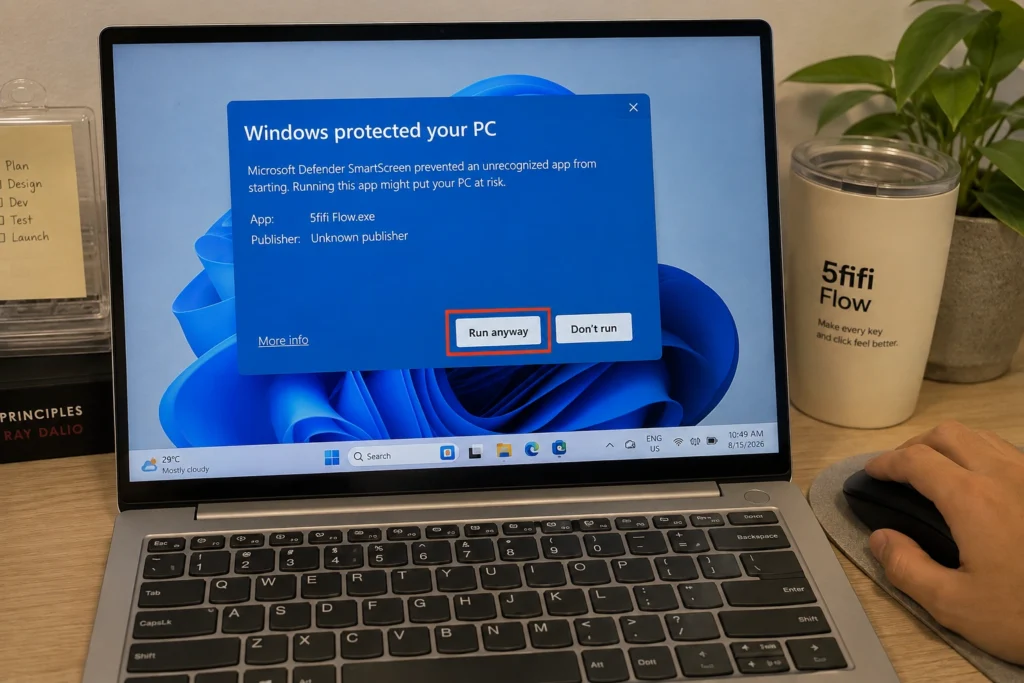
3. Run it anyway
This is Windows SmartScreen being cautious about apps without a paid publisher certificate, not a sign that anything is actually wrong.
- Click More info.
- Click the Run anyway button that appears.
5fifi Flow will now launch, and Windows remembers this choice. You won’t see this warning again for future launches.
4. Grant permissions if asked
5fifi Flow needs to listen for keystrokes and clicks system-wide so it can play sounds. It does not record or store what you type. The app will explain this and guide you through any prompts on first launch; just follow along.
That’s it, you’re set. If you run into any trouble, use the Report Bug link in the app’s menu, or reach out on the Help or Contact page. Enjoy the quiet, my friend
Prefer a guided walkthrough? Feel free to ask an AI assistant such as ChatGPT, Claude, Gemini, or Copilot to walk you through these steps.”
Wishing you a happy and peaceful day ahead.
— from 5fifi Flow Founder